
Platform: NinjaTrader® 8 Desktop
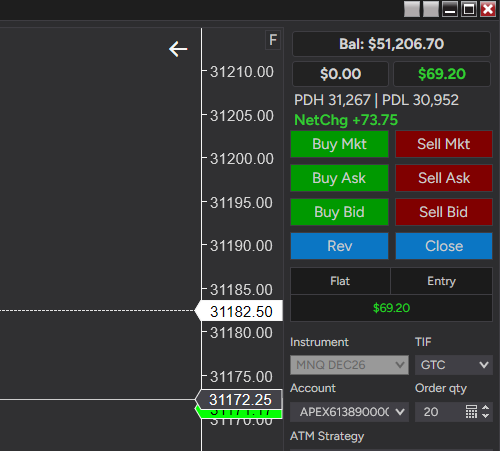
Many trading platforms show where the market is compared to yesterday’s close. Did the NQ crash 780 points? Is it up 130?
This context is vital information.
Also. if you trade prop firms, you shouldn’t have to leave the chart, or keep switching to the Control Center, to know where you stand, if you passed your eval.
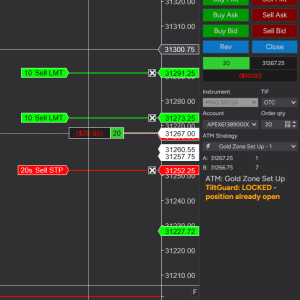
This Add-On puts a compact status block at the top of Chart Trader, where your eyes already are when you place an order.
Bonus feature: Mouse vertical drag with left click, without CTRL button.
On a standard NinjaTrader chart you can drag the chart to left and right using the left mouse button. However when you want to drag up or down, you need to also press the CTRL button. The add-on makes it possible to drag without the CTRL button, as long as you click on a blank chart area.
Mouse left button double click to F Focus — snaps and resizes the chart view back to fit the visible screen area if it has drifted off-screen or lost its auto-scale.
Why traders like it
- Everything in one place: the numbers sit above the Buy and Sell buttons, so you don’t hunt for them mid-trade.
- Prior-day levels: PDH and PDL are always in view, with no extra indicator or drawn lines on your chart.
- Net Change: How many points the instrument is up or down from yesterday’s close
- Reads at a glance: color tells you the direction before you read the number.
- Follows your chart: switch the chart’s instrument and the levels update on their own.
- Live data: the price comes straight from your market data feed.
How it works
The AddOn requests daily bars for the chart’s instrument to get the prior day’s high, low and close. It combines them with the live feed to calculate net change as the market moves.
Built for: futures traders on NinjaTrader 8 desktop who trade from Chart Trader, including prop-firm accounts where balance and drawdown awareness matters.
Install it, open a chart, and the block appears in Chart Trader.
Reviews
There are no reviews yet.